NK Office: Case Diary and Bank Work App for Advocates
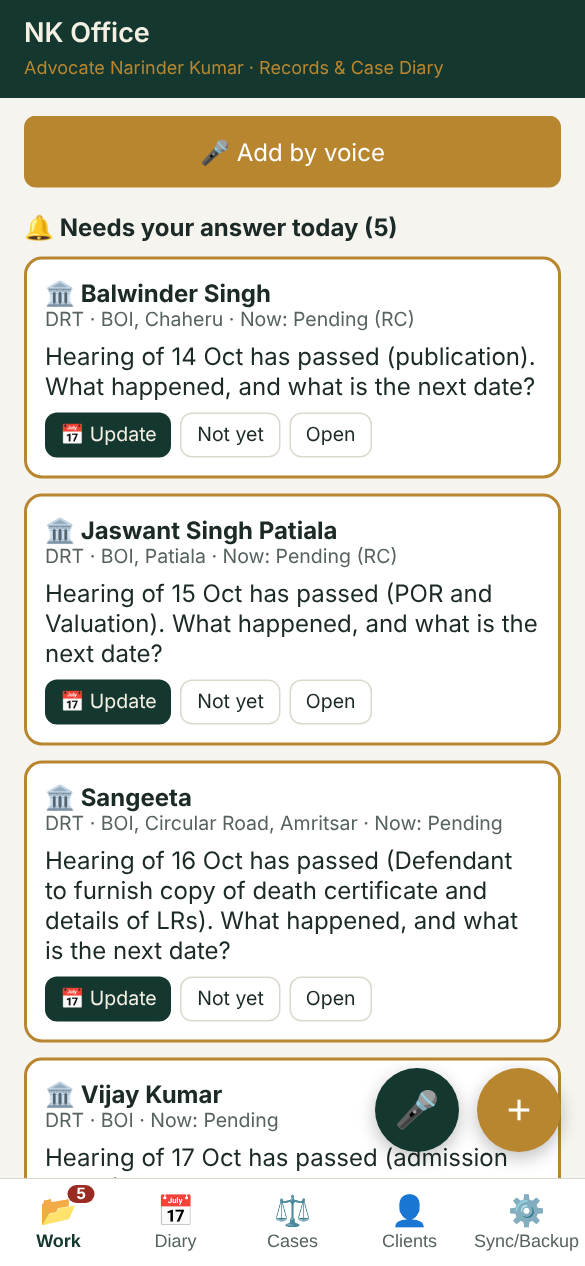
NK Office keeps an advocate's whole office on the phone: the court diary, DRT cases, title search reports, KCC and equitable mortgage files, bills and fees. Entries can be added by voice, and the app keeps asking whether each step is done until the work is closed.
Updates go to bank branches and clients in one tap, by email or WhatsApp, with a ready-made message.
What it does
Court diary
Today's cases, next dates and stages, with eCourts CNR links. Send the day's diary to a junior or munshi.
DRT cases
OA and RC numbers, tribunal, borrower, bank and branch, next date and purpose. Import your existing Excel list and download it back as Excel.
Updates to branches
One message per branch with the status of all its cases for the day, sent by email or WhatsApp.
Title search and KCC files
Each file moves through its steps: received, report sent, bill sent, payment received. Photos of documents stay with the file.
Bills and fees
Bills to banks with photos, and a fee ledger per case with balance due and a fee statement for the client.
Tell the client
Send the client the next date of their case on WhatsApp or email, signed with your name.
Voice entry
Speak in Hindi, English or Punjabi, for example "PNB Ranjit Avenue, title search of Ramesh Kumar received", and the entry is filled in.
Office sync
Sign in with Gmail to keep the data on every phone of the office, with access for a junior or munshi.
How to install it on your phone
- Open legalservicesforyou.in/diary in Chrome on Android, or Safari on iPhone.
- Android: tap the ⋮ menu, then Install app or Add to Home screen.
- iPhone: tap the Share button, then Add to Home Screen.
- Open it from the home screen and fill in My profile once, so messages carry your name.
हिंदी में: NK Office वकीलों के लिए फ़ोन ऐप है: कोर्ट डायरी, DRT केस, टाइटल सर्च रिपोर्ट, KCC फ़ाइलें, बिल और फ़ीस। ब्रांच और क्लाइंट को एक टैप में ईमेल या WhatsApp से अपडेट भेजें। बोलकर एंट्री करें।
Your data
Data stays on your phone. If you sign in with Gmail, it is also kept in your own office account so it comes back on a new phone. It is not shared with anyone else. Read the privacy policy.